Sunday, February 05, 2006

Computer: Picasa Test

Photo by Puvas Nandakwang Posted by Picasa

This is for testing Picasa 2's blogging capability only.

Friday, February 03, 2006

Study: Curve Fitting in Matlab

Matlab has a curve fitting toolbox that can make most of curve fitting tasks handy. If we know a formal form of a target function and perhaps can arrange it properly, curve fitting process should converge fast enough.

However, one of the major problems even when we know the formal form is that we can't arrange our term properly. In such a situation, many people try to use the generalized curve fitting capability in Matlab instead. However, it converges slower than it should be. For example, if we are going to fit hyperbolic function: y = a/(x-b), if we do not notice that this is actually a simplified version of rational form (http://www.mathworks.com/access/helpdesk/help/toolbox/curvefit/ch_fit10.html), we may resort to use general equation (http://www.mathworks.com/access/helpdesk/help/toolbox/curvefit/ch_fitt7.html#69221) . Although it is easier, it tends to converges slowly.

In case that we do not have the curve fitting toolbox, we may use an optimization toolbox instead. In fact, general equations defined in the curve fitting toolbox relies on the optimization toolbox. However, using the optimization toolbox requires more complicated management of data array.

Document on the optimization toolbox can be found at
http://www.mathworks.com/access/helpdesk/help/toolbox/optim/optim.html?BB=1.

And the most relevant page in the document is at
http://www.mathworks.com/access/helpdesk/help/toolbox/optim/ug/f3204.html#f1974

In summary, if we have a curve fitting toolbox, our curve fitting tasks will be very easy. But only optimization toolbox is sufficient. Please note that the curve fitting toolbox do not work independently; you need to have statistics and optimization toolboxes as well.

FYI:
http://www.mathworks.com/access/helpdesk/help/toolbox/curvefit/
http://www.mathworks.com/access/helpdesk/help/toolbox/optim/ug/
http://eng.usna.navy.mil/~mecheng/DESIGN/CAD/MATLAB/matlab/matlabl8.html
http://www.mathworks.com/access/helpdesk/help/toolbox/curvefit/ch_fit10.html
http://www.zoo.ufl.edu/bolker/emd-2000/lect4.html

Thursday, February 02, 2006

English: What I learned from the first draft

  1. Don't mention a thing that we will not talk about it later. Although it may look good for an introduction, it actually not good for reader at all. Try to find a new way for introduction is a better choice.
  2. When we say "the problem" for the first time, it is better to include a good adjective representing "the problem'. For example, "to alleviate the computational complexity problem". Plus, it is generally better if we show an example of a problem in the first time we mention that problem (show the computation complexity).
  3. There may be parts that are off-topic due to the scope of our article. Try to get rid of them as much as possible. Always remind ourselves that we have a specific goal, not a general goal, in every writing.

Saturday, January 14, 2006

Computer: Batch Conversion of Legacy Docs to OOo

ตามลิงค์นั่นแหละ
http://www.xml.com/pub/a/2006/01/11/from-microsoft-to-openoffice.html

Monday, December 26, 2005

Dharma: Offering and Vow before Meal

I make offerings to the Buddha.
I make offerings to the Dharma.
I make offerings to the Sangha.
I make offerings to all sentient beings.

I vow to deliver numerable sentient beings.
I vow to cut off endless vexation.
I vow to master the limitedless approaches to Dharma.
I vow to attain supreme buddhahood.

Computer: Testing drive compression on Windows XP

Dec 26, 2005:

I am testing drive compression on my new Hitachi hard drive. At this moment, I found that it works quite well and very efficiently.

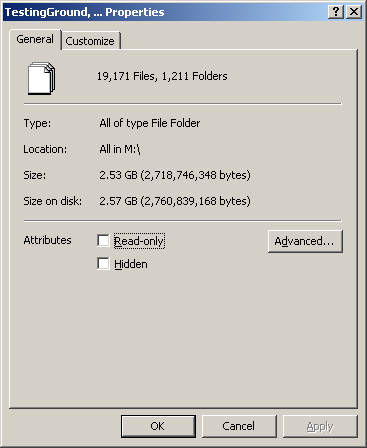
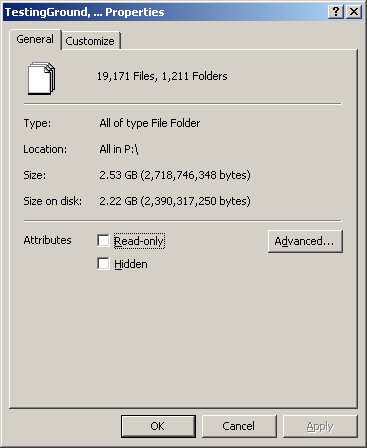
I copy 2.53GB of data from my trusty Maxtor to the new Hitachi drives. The size on the uncompressed Maxtor drive is 2.57GB (Figure 1), but the size on the compressed Hitachi drive is only 2.22GB (Figure 2). The side effect is the cost for CPU overhead. During copying, CPU usage is virtually 100%. The drive with compression will be shown with blue label, while the common ones are in the block label (See figure 3).

Figure 1. Size on uncompressed volume is 2.57GB, which is larger than the size of data.

Figure 2. Size on compressed volume, which is smaller than the size of data.

Figure 3. Label of a compressed volume is blue, while others are black.

Experiment about copying time was conducted too. I copied about 2.53 GB of data from an USB uncompressed hard drive to a Firewire hard drive. The Firewire drive was uncompressed for the first phase of copying experiment. Then the same Firewire drive was compressed to perform the second phase of copying experiment. The first phase of copying finished in 5:01 minutes, while the second phase spended up to 6:29 minutes. The space was saved by 13.6%, but writing time increased by 29.2%. This implies that for the test data, it is not a big deal to use compressed volume to save disk space unless we are really run out of space.

I may stop using this feature if I am going to use the new hard drive as a main one. At this point, I am testing the new drive, along with its Firewire interface, to find if the new solution is reliable, but is faster than my old solution. A faster hard drive, will be the main one, and the slower one will be a backup one.

Computer: Enclosure Issues

Dec 26, 2005:
I obtained a new Syba enclosure a few days before, and it causes so many problems First, it corrupts data on my trusty Maxtor hard disk. Second, the fan is surprisingly noisy. I found out later that the fan itself is not very noisy, but the fan along with airflow rushing into the enclosure is very noisy. Third, LEDs do not work. Again, I found out later that workers at assembly lines do something wrong or document is not accurate, since I need to flip the direction of LED power line to make it works correctly.

I need to go back to use the old enclosure for my trusty hard drive.

At this moment, I bought a new Hitashi Deskstar 7K250 hard drive (160GB/IDE interface) to use with the new enclosure. I am testing if it can work correctly with my new hard drive. My trusty Maxtor might not work with this new Syba enclosure just because I enabled delayed write feature for it. I need to wait and see.

Dec 26, 2005:
Okay, I now realize that the issue about delayed write of this enclosure persists and I need to switch to use quick removal optimization mode. The performance is dropped by about 20%. Referred by my next post, a test on the same data takes 6:26 minutes for uncompressed volume with no delayed write.

So, the new hard drive will be used as a backup volume. I also plan to make it a CVS repository.

At this point, I have two things to do with my hard drive before building a ghost image for a hard drive:
1. Install Matlab toolbox.
2. Get key for dictionary.

Friday, December 23, 2005

Study: Going to finish Exam A preparation

รู้สึกว่าพลังฝึกปรือเริ่มได้ที่ตอนนี้คงเหลือแค่เขียนสรุปอีกเล็กน้อยแล้วก็ช่วยแหละคุณ Sandra นิดหน่อยก็น่าจะผ่านได้ค่อนข้างแน่ ดังนั้นขอสรุปสิ่งที่ต้องเขียนและศึกษาเพิ่มเติมสักเล็กน้อย

  • Algorithm part
    1. ศึกษาปัญหาของ dynamic programming ตรงส่วนที่เป็น final exam อีกครั้งแล้วบันทึกบทสรุปออกมา

    2. ศึกษาคุณสมบัติของกราฟอัลกอริทึมแบบต่างๆ โดยเฉพาะ running time และเงื่อนไขของ applicability ของแต่ละอัลกอริทึม

  • Programming language part
    1. Lamda calculus
    2. Function activation record mechanism
    3. Concurrency in Java

Monday, December 19, 2005

Life: ไปให้ถึงที่สุดของความอดกลั้น

Dec 19, 2005:
เรานึกถึงเรื่องราวของตัวเองที่ Retreat Center แล้วเราพบว่า เพราะตอนนั้นเราไปถึงที่สุดของความอดทน ทำให้เราได้ของขวัญมาอย่างหนึ่งคือความไม่เมื่อยล้าในเวลานั่ง. ทำให้ในเวลานี้เรานึกเพิ่มเติมต่อไปว่าถ้าเราจะไปให้ถึงที่สุดของความอดกลั้ นคือความละเว้นจากความบันเทิงทั้งมวลและการเสพสุขทั้งมวลแล้วเราจะได้อะไรเป ็นของขวัญ เราจะลองทำดู ในเมื่อพระพุทธเจ้าบอกไม่ให้เสพกามเราก็จะลองทำดู ที่ retreat center เราอดทนด้วยศรัทธาอันแรงกล้า ในเวลนี้เราก็จะอดกลั้นด้วยศรัทธาอันแรงกล้าเช่นกัน. อันปัญญาของเรามีเพียงเท่าเศษธุลีอวกาศ เราคงต้องดันตัวเองจากความเชื่อก่อนไม่งั้นคงไปได้ไม่ไกลนัก.

(หมายเหตุ กามหมายความรวมคือ รูป รส กลิ่น เสียง สัมผัส ไม่ได้เจาะจงอยู่ที่เรื่องเพศเท่านั้น)

Computer: Software in my Computers

Dec 19, 2005:
ตอนนี้คิดจะทำการฟอร์แมตเครื่องเพื่อล้างวินโดวส์ใหม่ ก็เลยต้องการทำรายการซอฟต์แวร์ที่ต้องลงแน่ๆ พร้อมๆกับหมวดหมู่ของซอฟต์แวร์ต่างๆในเครื่อง พร้อมๆกับรายการแบ็คอัพ เราจะทำการเปลี่ยนโครงสร้างพาร์ติชันของฮาร์ดดิสก์ให้เป็นแบบพาร์ติชันเดียว แล้ว เพราะพาร์ติชันอันที่สองที่สามก็มีอยู่ที่ฮาร์ดิสก์แบบภายนอก

  • รายการแบ็คอัพ
    1. Mail and favorites in Mozilla
    2. Thesis (this portion will not be formatted though)
    3. Personal Web
    4. Thai Student Association Web
    5. My Documents
    6. Testing Ground
    7. Work Partition
    8. Droplet Recognition
    9. VFX
    10. Candidacy Note (included in Personal Web Actually)
    11. Files for Prolog and ML
    12. Java project files

  • รายการซอฟต์แวร์แบ่งตามหมวดหมู่
    1. Dictionaries
      • Stedman's medical dictionary
      • Cambridge's advanced learner dictionary
      • Longman's dictionary of contemporary English
      • Random house
      • So Sethabutr's dictionary
      • WordWeb

    2. Communication
      • Secure Shell Client
      • Mozilla
      • Firefox Thai
      • MSN
      • Cisco VPN
      • Filezilla
      • Humming Bird
      • Cygwin

    3. Programming and Research
      • Studio (3D Viewer)
      • Virtual Navigator and ROI Surface Writer
      • Studio 8 (Macromedia's)
      • Visual Studio .Net 2003
      • Eclipse
      • CVS (not now, use unmanaged snapshot may be better)
      • jEdit
      • Apache Webserver
      • PHP engine
      • Prolog
      • ML

    4. Entertainment
      • Napster
      • Windows media player latest version
      • iTune
      • Arcsoft Showbiz
      • QuickTime
      • Power DVD

    5. Document Tools
      • WinEdt and MikTex
      • OpenOffice.org 2.0
      • Microsoft Office 2003
      • GIMP
      • Dia
      • PDF Creator
      • PDF 995
      • PDF Blender
      • GhostScript
      • GhostView
      • Adobe Acrobat (via Adobe Creative Suite 2)
      • Doxygen

    6. Utilities
      • DVD Writer
      • FileAnt (File Explorer)
      • NetAnt
      • GetLeft
      • 7-zip
      • Samsung driver and utilities


Computer: Firewire Enclousure

On Wednesday night Dec 14, 2005, Jua came to my apartment and tried to download his robotic vehicle movie from video camera to a disk. At first, it is expected that my laptop could not do the job since it has only 4-pin Firewire interface, but the connector line from the camera had 6-pin interface. However, I realized that my DVD writer enclosure came with Firewire interface and can be connected to other products in a serial manner. Plus, the connector in my enclosure is 6-pin interface. So, I connect the camera through my enclosure and got that job done.

The bottom line is if your enclousure has Firewire interface, you can use it as a Firewire convertor as well. This can add value to your enclosure.

Today (Sunday Dec 18, 2005), I just bought a new enclosure for my hard disk to give it Firewire interface instead of USB 2.0, because Firewire gives more bandwidth, even though its theoretical bandwith is lower than USB 2.0. I think I will connect my devices-- hard drive and DVD drive-- through Firewire instead.

Computer: Disc Publisher


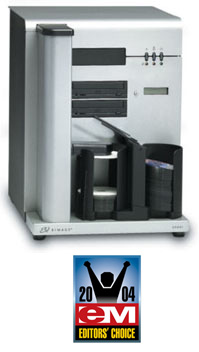
I got an advertisement about Disc publisher (CD/DVDs copier and printer) from Rimage. It is quite interesting product, esp. for a small software company or any organization that may publish some media at small scale (less than 1000 copies). Their products offer all-in-one solution--duplicator and printer (both text and images). Plus, we can input them 100 discs for a single job. Hmm, it's a good idea to use it for public presentation.

Tuesday, December 06, 2005

Study: News about CAS

I read news about Computer Aided Surgery from manager.co.th; however, I still do not know its technique to mark target area. Actually, I write this blog just to keep the link here for later reference:
http://manager.co.th/QOL/ViewNews.aspx?NewsID=9480000167345

Saturday, December 03, 2005

ชีวิต: เรื่อง รถโฆษณาในรัฐพ่อค้า โดย นิธิ เอียวศรีวงศ์

เป็นอีกบทความที่ยอดเยี่ยมของนิธิ เอียวศรีวงศ์ ที่แสดงให้เห็นว่าความคิดที่เป็นการเข้าข้างฝ่ายพ่อค้าและผู้มีเงินแท้จริงเ ป็นความคิดที่ฝังรากลึกอยู่ในระบบการดำเนินชีวิตของคนเราแม้ในที่ที่เราคิดไ ม่ถึง

ในบทความกล่าวเกี่ยวกับรถโฆษณาที่วิ่งช้าๆบนถนน มันถูกกระทำเพื่อประโยชน์ของพ่อค้า แต่ทำให้สังคมเสียผลประโยชน์ทั้งทางด้านเวลา และค่าน้ำมันที่ทุกวันนับแต่จะแพงขึ้นทุกทีๆ แต่เรากลับปล่อยให้กลุ่มพ่อค้าที่เป็นคนได้ประโยชน์จากรถโฆษณานั้นกระทำการต ่อไปเรื่อยๆโดยที่เราไม่ยอมปริปากออกมาคัดค้านกันเลย

เช่นเดียวกับคำ ขู่ของรํฐบาลที่ตำหนิคำวินิจฉัยของศาลตุลาการเกี่ยวกับการระง ับการขายหุ้น กฟผ. ว่าทำให้ตลาดหุ้นซบเซา แต่แท้จริงแล้วคนไทยที่อยู่ในตลาดหุ้นตามบทความของอาจารย์นิธินั้นมีน้อยกว่ า 0.25% ยิ่งไปกว่านั้น ความซบเซามันมาจากการที่พวกเก็งกำไรในระยะสั้นถอนหุ้นออกไป ซึ่งหุ้นพวกนั้นไม่ได้สร้างความแข็งแกร่งอะไรให้กับบริษัทหรือโรงงานเลย การที่คนพวกนั้นถอนหุ้นออกไปที่แท้ก็จะไม่กระทบกับภาพรวมทางเศรษฐกิจเลย แต่หลายคนในประเทศเรากับมาพะวงสนใจกับผลประโยชน์อันไม่ยั่งยีนของคนเพียง 0.25% โดยไม่คำนึงถึงผลกระทบกับสังคมโดยรวมเลย

ส่วนที่สำคัญอีกอย่าง ของบทความก็คือ การพูดถึงการรักษาความเป็นชุมชนของชาวเชียงใหม่ที่นับวันจะหลงทางไปทุกที พวกเค้าพยายามรักษารถโฆษณาที่ไม่เข้ากับสภาพเศรษฐกิจในปัจจุบัน แต่กลับไม่รักษาพวกประเพณียี่เป็ง งานปีใหม่ งานสวดมหาชาติ ให้เป็นของชุมชน กลับปล่อยให้มันกลายเป็นงานของ ททท. เพื่อผลประโยชน์ทางการค้าอีกเช่นเคย เรื่องนี้เราก็พึ่งสังเกตว่าคนต่างชาติจะเข้าใจว่าของพวกนี้เป็นวิถีชีวิตขอ งชาวท้องถิ่น แต่ที่จริงความเป็นส่วนหนึ่งของชีวิตคนในชุมชนมันจางหายไปหมดด้วยการที่ประเ พณีถูกทำให้เป็นเพียงส่วนหนึ่งของการค้าและการท่องเที่ยวเท่านั้น

อ้างอิง
นิธี เอียวศรีวงศ์ มติชนสุดสัปดาห์ 2 ธ.ค. 2548 ฉบับที่ 1320 http://www.matichon.co.th/weekly/weekly.php?srctag=0414021248&srcday=2005/12/02&search=no

Thursday, November 24, 2005

Computer: ซ่อมคอมพี่ หนู อรอนงค์

Nov 17, 2005
วันนี้ซ่อมคอมพี่หนูทำให้ได้เรียนรู้อะไรหลายอย่างเพิ่มเติมคือ
1. ntfs.com มีโปรแกรมให้ดึงข้อมูลจาก partition ntfs ได้เลยโดยไม่ต้องบูตวินโดวส์
2. พึ่งเคยเห็น SMART มันทำงานเป็นครั้งแรกในชีวิต แต่ลองฟอร์แมตดูเราก็ยังไม่พบว่ามันมีอะไรผิดตรงไหน งง
3. บางครั้งฟอร์แมตไม่ได้ แต่ลบพาร์ติชินก่อนแล้วค่อยฟอร์แมตจะได้ ซะงั้ืน
4. HP ก็ทำพาร์ติชันเก็บไดรเวอร์เหมือนกัน ซึ่งพาร์ติชันพวกนี้จะถูกเก็บไว้เป็นพาร์ติชันแรก อย่าลบออกเป็นอันขาด

5. เวลาที่จะลงวินโดวส์ทับตัวเดิม มันจะขอให้เรา backup ข้อมูลก่อน ทางที่ดีอย่าทำเป็นอันขาด เพราะมันอาจจะไปฟอร์แมตอีกพาร์ติชันหนึ่งเพื่อทำการแบ็คอัพเอาดื้อๆ ถ้าจะทำให้ระวังตัวด้วย

6.
บางทีเครื่องมีการซ่อนน็อตเอาไว้เพื่อให้ดูสวยงาม ดังนั้นถ้าแกะไม่ออกก็ให้ดูดีๆว่ามีตรงไหนที่มีการใ้ช้ยางมาปิดไว้หรือเปล่า เพราะน็อตอาจถูกซ่อนไว้ในนั้น

Misc: Notepad++, jEdit, and UML stencil for Visio

Nov 23, 2005:
ไปเจอโปรแกรม Notepad++ ที่ Sourceforge มา เราพบว่ามันพับโค้ด XML ได้ด้วย ถ้าหากว่า Macromedia Studio 8 มันทำไม่ได้เราคงจะดาวน์โหลดไอ้ตัวนี้มาลองใช้ดู

jEdit เวอร์ชันปัจจุบันดูดีมาก แถมรู้สึกว่ามันยังพับโค้ด XML ได้ด้วย แต่ที่แจ๋วที่สุดก็คงจะเป็นเรื่องที่ว่ามันสามารถทำการสร้าง XML Tree ให้เราได้ด้วย ดังนั้นคิดว่ามันต้องมีความสามารถเหนือกว่า Notepad++ แน่นอน

มี Visio stencil ที่ทำเองให้ดาวน์โหลดด้วย แสดงว่า ถ้าหากเราไม่ได้ซื้อ profession edition มาใช้ เราก็ยังสามารถว่า UML diagram ได้ ดาวน์โหลดที่ http://www.phruby.com/stencildownload.html

Wednesday, November 23, 2005

Computer: Hard disk planning

สำรวจ Hard disk มาเพื่อที่จะเตรียม format เมื่อจบภาคการศึกษา
1. รวม partition เป็นอันเดียวจะดีที่สุด เพราะ hard disk อีกตัวก็มีอีกสอง partition อยู่แล้ว

2. พบว่า program ที่อยู่ใน "Program Files" มีประมาณ 12GB ที่อยู่ข้างนอกก็คงมีไม่เกิน 3GB

3. ต่อไปโปรแกรมทุกอย่างจะต้องถูกลงไว้ที่ "Program Files". ใครไม่มี default path เป็น "Program Files" ก็ให้ลงไปที่ "ProgramFiles" ที่สร้างขึ้นมาใหม่. ส่วนสาเหตุที่ไม่เอาไปลงไว้ที่เดียวกันหมดก็เพราะว่ามันอาจจะมีโปรแกรมบางตั วที่มันไม่สามารถใช้กับ path ที่มี space ได้ซะงั้น.

4. ยังอยากจะใช้ CVS อยู่. ดังนั้น ตอนลง CVS ก็ให้มันใช้พื้นที่บนฮาร์ดดิสก์ภายนอกเป็นที่เก็บละกัน.

5. มีแค่นี้แหละอย่างอื่นๆก็ไปจัดการทีหลังละกัน แต่ยังไงก่อนฟอร์แมตก็ต้องลิสต์ซอฟต์แวร์ที่จะลงก่อนว่ามีอะไรบ้างและจัดหมว ดหมู่ให้ดูเนี้ยบๆหน่อย

Computer: เรื่องหน้ารู้ที่พึ่งรู้

Nov 23, 2005:
เนื่องจากว่าเราคิดที่จะวางแผนซื้อคอมก็เลยรู้เรื่องอะไรต่างๆเพิ่มขึ้นมากมาย ที่น่าสนใจก็มีดังนี้
1. PCI Express กับ PCI X มันคนละตัวกัน
PCI Express มันจะไม่ compat กับ PCI แบบเก่าเลย และมันก็จะใช้ช่องสัญญาญแยกแต่ละอุปกรณ์เลย (dedicated bandwidth) นอกจากนี้มันจะมีช่องรับและส่งข้อมูลแยก คล้ายๆกับ AGP 2x
ส่วนของ PCI-X ก็จะยังแชร์ข้อมูลระหว่างอุปกรณ์อยู่ แต่ว่ามันคอมแพตกับอุปกรณ์เก่าๆด้วย ข้อควรระวังของ PCI-X ก็คือ ถ้าหากเราใช้อุปกรณ์เร็วๆ ร่วมกับอุปกรณ์เก่าๆช้าๆ PCI-X จะต้องปรับความเร็วเพื่อรออุปกรณ์ช้า เพราะว่ามันใช้ทุกอย่างร่วมกันนั่นเอง

2. SATA II ส่งข้อมูลได้ 3Gb/s และ RAID controller ที่ติดมากับบอร์ดมันมีมากเหลือเกิน ลองเป็นแบบนี้ซื้อ hard disk มาสองตัวอาจจะดีกับงานเราก็ได้ อย่าง board ที่ใช้ nForce 4 SLI จะมี RAID 5 และ 1/0 ให้มาใน chipset เลย http://nvidia.com/page/pg_20041015917263.html

3. IEEE 1394b 9pin: หลังจากที่ปล่อยให้ USB 2.0 มี theoretical bandwidth มากกว่า Firewire ก็ออกเวอร์ชันใหม่ที่ไม่คอมแพตกับเวอร์ชันเก่าออกมา และเร็วขึ้นกว่าเดิมเท่าตัวเป็น 800 Mbps แต่ไม่ค่อยมีอุปกรณ์ออกมาให้เห็นเลยนะ หรือว่ามีแต่เราไม่รู้เเองก็เป็นได้

4. Gigabit network is every where: พวกนี้ติดมากับ chipset แต่แรกเลยเช่นกัน เผลอแป๊ปเดียวเค้ามี Gigabit network กันเป็นว่าเล่นเหอะๆ

5. VGA card แบบ multi-view พบว่ามันมีขายเกลื่อนตลาดเช่นกัน แต่มีปัญหานิดหน่อยเท่านั้นเองว่าจอหนึ่งจะต้องใช้แบบ analog interface เพราะว่าช่องต่อแบบ DVI มันจะมีมาให้แค่อันเดียว แต่เราก็ไม่รู้หรอกว่า ใช้แบบ DVI แล้วมันช่วยอะไรเราได้บ้าง และพวกที่ทำ video grabber ได้นี่ต้องเป็นยัง

6. PC 3200 คือ DDR 400 และจะเป็น DDR ที่เร็วที่สุดเท่าที่เป็นไปได้ก่อนที่จะต้องยกเครื่องไปเป็น DDR2 แทน ซึ่งโรดแมพของ AMD ก็แสดงให้เห็นว่ากำลังพัฒนา CPU ตัวเองให้รับ DDR2 ได้เช่นกัน ส่วนทาง Intel นี่เราไม่รู้และคิดว่าอาจจะไม่จำเป็นที่ต้องใส่ไ้ว้ใน road map ของ Intel CPU เพราะว่ามันยังจัดการเมมโมรีที่ตัว chip set อยู่

7. ความแตกต่างระหว่าง DDR, DDR2, GDDR2, and GDDR3: ไปดูมาที่
http://www.hardwaresecrets.com/article/167/1 และ http://www.hardwaresecrets.com/article/26 และ http://www.hardwaresecrets.com/article/168 พบว่าให้ความรู้ดีมาก

DDR2 นั้นมีพัฒนาการที่สำคัญที่สุดก็คือ มันตรวจ resistive termination ที่บนชิพ ไม่ใช่ที่ mainboard ทำให้สัญญาณที่ได้ชัดขึ้นมากทำให้ช่วงเวลาที่อ่านค่าได้อย่างปลอดภัยมีมากขึ ้นและเป็นเหตุผลทีทำให้่สามารถเพิ่มความถี่ไปที่ DDR2 800 ได้ (จริงๆคือ 400x2 นะ) นอกจากนี้ DDR2 ก็ใช้ไฟเพียง 1.8V เทียบกับ DDR ที่ใช้ถึง 2.5V ทำให้ DDR2 มีปัญหาความร้อนน้อยกว่า

ส่วนความแตกต่างของ DDR กับ GDDR ส่วนใหญ่ก็เป็นพวกคุณสมบัติทางไฟฟ้าเท่านั้น และ GDDR ก็จะใช้ voltage มากกว่า เช่นของ GDDR2 นั้นพบว่าใช้ไฟมากถึง 2.5 volt ทำให้มันร้อนมากและไม่ค่อยมีใครใช้กับ VGA board เท่าไหร่ ส่วนมากจะข้ามไปใช้ GDDR3 บน high-end board เลย

ปล. เว็บไซต์เรื่องเมมโมรีมันตั้งชื่อได้ดีมาก Hardware Secrets: Uncomplicating the Complicated ไอ้ประโยคข้างหลังนี่มันจับใจจริงๆ

ปอ. latency ของ DDR2 จะต้องใช้หลาย clock cycles มากกว่า DDR แ่ต่ก็อย่าลืมนะว่าใช้ cycle มากขึ้นก็ไม่ได้หมายความว่า latency ในฐานะเวลาจริงมันจะมากกว่าเพราะว่า DDR2 ทำงานที่ความถี่ที่สูงขึ้น ซึ่งเหตุการนี้คล้ายกับการที่ latency ของ DDR400 มากกว่าพวก DDR333

Sunday, November 20, 2005

Tips: Hyphenation in MS Word

Nov 19, 2005:
วันนี้พยายามให้ Word มันทำ hyphenation แบบเดียวกับที่ Laธex ทำอยู่ก็พบว่าสามารถไปทำได้ที่เมนู
Tool->Language->Hyphenation...
มันไปอยู่ที่ language นี่เองทำให้หาไม่เจอ แต่มันก็จะไม่ขยาย space แบบ latex ให้อยู่ดี ซึ่งเราคิดว่าก็อาจจะดีก็ได้สำหรับฟ้อนต์ขนาด 12 ที่เราใช้อยู่ แต่ถ้าเป็นฟ้อนต์ขนาด 10 ล่ะก็เราคิดว่าทำแบบ LaTex จะสวยมาก

ขอบคุณเว็บ http://wordtips.vitalnews.com/Pages/T0616_Hyphenating_Your_Document.html ที่ให้ข้อมูล

Thursday, November 17, 2005

Study: Plan

Nov 17, 2005:
I talked with Dr. Higgins and I am going to make a concurrent program of Master and Ph.D. degrees at the same time. I'm now going to very seriously prepare for a candidacy exam held on Jan 13 or 20 (not officially announced yet) as a partial fulfillment of Ph.D. program. For coursework, It's good to hear that all classes I taken here can be transferred to Ph.D. program; i.e., 34 coursework credits will be transfered. These 34 credits are: 1 credits of colloquium, 15 credits of 4xx level courses and 18 credits of 5xx level courses.

Because colloquium can be counted for 4xx, not normal 5xx level courses. I need to take three more of 5xx level courses and one more of 4xx level one.

For the next semester, I will take 586 computer vision, 591 Research in CSE and one another course I cannot decide yet, but probably an English writting course. Plus, 2 credits for thesis research to secure full-time status.