(Jan 25, 2008)
I tried to display an ampersand (&) in MFC controls (Visual C++ 2005), specifically tab controls. The problem is a literal "A & B" was displayed "A B" in MFC controls.
To fix this, we have to replace & with &&. Namely, use "A && B", instead of "A & B".
source: http://forums.microsoft.com/MSDN/ShowPost.aspx?PostID=1597754&SiteID=1
Showing posts with label MFC. Show all posts
Showing posts with label MFC. Show all posts
Friday, January 25, 2008


Wednesday, January 23, 2008
Mysterious MFC Compile Error
(Jan 23, 2008)
I got a mysterious compile error today. It said one of a resource ID, IDD_SUP_VENA_CAVA is not defined / declared in this line:
// Dialog Data
enum { IDD = IDD_SUP_VENA_CAVA };
Dr. Yu suggested me include resource.h. I did and it worked fine, but I really don't understand why I don't need such includes in other places. That's why I think it's mysterious.
I got a mysterious compile error today. It said one of a resource ID, IDD_SUP_VENA_CAVA is not defined / declared in this line:
// Dialog Data
enum { IDD = IDD_SUP_VENA_CAVA };
Dr. Yu suggested me include resource.h. I did and it worked fine, but I really don't understand why I don't need such includes in other places. That's why I think it's mysterious.
Saturday, January 19, 2008
MFC: Practice using tab control
(Jan 19, 2008)
After try using MFC's tab control (CTabCtrl) from http://www.forteach.net/Programming/c/26492.html
and
http://www.ucancode.net/faq/CTabCtrl-VC-SetWindowPos.htm
The first one seems to give more concise and be easier to follow.
There are also some important points I'd like to note:
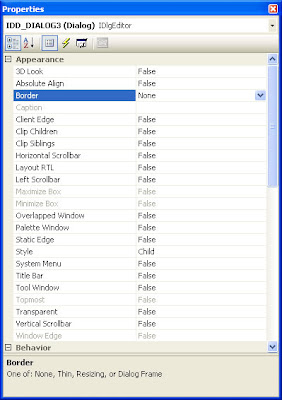
1. Do not forget to change 'style' of a tab sheet from 'popup' to 'child'. If you do not make such change, the position of a tab sheet may be at the top left corner of the screen.
2. Tab sheet should be set to have no border (Border = none).
3. CTabCtrl must be derived. It seems there is no simpler way for this, although initialization code for our derived class may be very common as used in http://www.forteach.net/Programming/c/26492.html
4. Tab control must have this message map,
ON_NOTIFY_REFLECT(TCN_SELCHANGE, OnSelchange).
Otherwise, changing tab is impossible.
5. As usual before a dialog which has a derived tab control in it can be shown, we need to 'Create' it. Declaration does not mean 'Create' at all.
m_myDialog.Create( IDD_MAIN_DLG );
m_myDialog.ShowWindow( SW_SHOW );
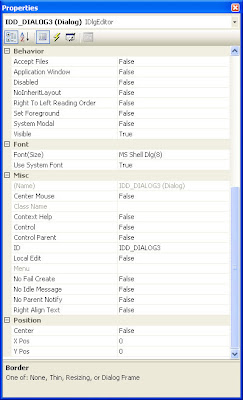
6. Properties for a common tab sheet are shown in the following images:
Private copy: http://docs.google.com/Doc?id=dggq8h5d_38hbbr8bcb
After try using MFC's tab control (CTabCtrl) from http://www.forteach.net/Programming/c/26492.html
and
http://www.ucancode.net/faq/CTabCtrl-VC-SetWindowPos.htm
The first one seems to give more concise and be easier to follow.
There are also some important points I'd like to note:
1. Do not forget to change 'style' of a tab sheet from 'popup' to 'child'. If you do not make such change, the position of a tab sheet may be at the top left corner of the screen.
2. Tab sheet should be set to have no border (Border = none).
3. CTabCtrl must be derived. It seems there is no simpler way for this, although initialization code for our derived class may be very common as used in http://www.forteach.net/Programming/c/26492.html
4. Tab control must have this message map,
ON_NOTIFY_REFLECT(TCN_SELCHANGE, OnSelchange).
Otherwise, changing tab is impossible.
5. As usual before a dialog which has a derived tab control in it can be shown, we need to 'Create' it. Declaration does not mean 'Create' at all.
m_myDialog.Create( IDD_MAIN_DLG );
m_myDialog.ShowWindow( SW_SHOW );
6. Properties for a common tab sheet are shown in the following images:


Private copy: http://docs.google.com/Doc?id=dggq8h5d_38hbbr8bcb
Subscribe to:
Posts (Atom)