(Jan 23, 2008)
There is a blog complaining about this. It shows some reasons that this issue is a major problem for a laptop. I agree with him, although mine is a desktop.
As of Jan 23, 2008, Microsoft does not have a patch for this issue, but hotfix is available from here
Wednesday, January 23, 2008


Mysterious MFC Compile Error
(Jan 23, 2008)
I got a mysterious compile error today. It said one of a resource ID, IDD_SUP_VENA_CAVA is not defined / declared in this line:
// Dialog Data
enum { IDD = IDD_SUP_VENA_CAVA };
Dr. Yu suggested me include resource.h. I did and it worked fine, but I really don't understand why I don't need such includes in other places. That's why I think it's mysterious.
I got a mysterious compile error today. It said one of a resource ID, IDD_SUP_VENA_CAVA is not defined / declared in this line:
// Dialog Data
enum { IDD = IDD_SUP_VENA_CAVA };
Dr. Yu suggested me include resource.h. I did and it worked fine, but I really don't understand why I don't need such includes in other places. That's why I think it's mysterious.
Saturday, January 19, 2008
MFC: Practice using tab control
(Jan 19, 2008)
After try using MFC's tab control (CTabCtrl) from http://www.forteach.net/Programming/c/26492.html
and
http://www.ucancode.net/faq/CTabCtrl-VC-SetWindowPos.htm
The first one seems to give more concise and be easier to follow.
There are also some important points I'd like to note:
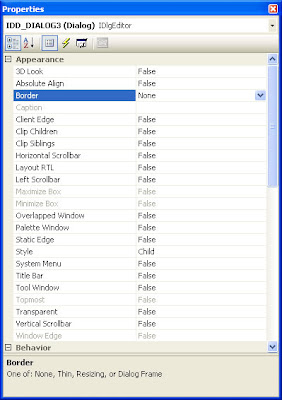
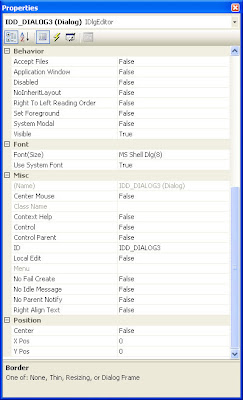
1. Do not forget to change 'style' of a tab sheet from 'popup' to 'child'. If you do not make such change, the position of a tab sheet may be at the top left corner of the screen.
2. Tab sheet should be set to have no border (Border = none).
3. CTabCtrl must be derived. It seems there is no simpler way for this, although initialization code for our derived class may be very common as used in http://www.forteach.net/Programming/c/26492.html
4. Tab control must have this message map,
ON_NOTIFY_REFLECT(TCN_SELCHANGE, OnSelchange).
Otherwise, changing tab is impossible.
5. As usual before a dialog which has a derived tab control in it can be shown, we need to 'Create' it. Declaration does not mean 'Create' at all.
m_myDialog.Create( IDD_MAIN_DLG );
m_myDialog.ShowWindow( SW_SHOW );
6. Properties for a common tab sheet are shown in the following images:
Private copy: http://docs.google.com/Doc?id=dggq8h5d_38hbbr8bcb
After try using MFC's tab control (CTabCtrl) from http://www.forteach.net/Programming/c/26492.html
and
http://www.ucancode.net/faq/CTabCtrl-VC-SetWindowPos.htm
The first one seems to give more concise and be easier to follow.
There are also some important points I'd like to note:
1. Do not forget to change 'style' of a tab sheet from 'popup' to 'child'. If you do not make such change, the position of a tab sheet may be at the top left corner of the screen.
2. Tab sheet should be set to have no border (Border = none).
3. CTabCtrl must be derived. It seems there is no simpler way for this, although initialization code for our derived class may be very common as used in http://www.forteach.net/Programming/c/26492.html
4. Tab control must have this message map,
ON_NOTIFY_REFLECT(TCN_SELCHANGE, OnSelchange).
Otherwise, changing tab is impossible.
5. As usual before a dialog which has a derived tab control in it can be shown, we need to 'Create' it. Declaration does not mean 'Create' at all.
m_myDialog.Create( IDD_MAIN_DLG );
m_myDialog.ShowWindow( SW_SHOW );
6. Properties for a common tab sheet are shown in the following images:


Private copy: http://docs.google.com/Doc?id=dggq8h5d_38hbbr8bcb
Monday, January 14, 2008
Blood system in the mediastinum

(Jan 14, 2008)
I found an image of major blood vessels in mediastinum. It tells me about the names of blood vessels I want to know, especially, azygos vein, right and left innominate veins.
By the way, I'd like visualization in this page
(http://seram2006.pulso.com/modules.php?name=posters&idcongresssection=&d_op=viewposter&sec=&idpaper=880&part=2&full=&papertype=2&haveportada=1&viewposter=1)
I found an image of major blood vessels in mediastinum. It tells me about the names of blood vessels I want to know, especially, azygos vein, right and left innominate veins.
By the way, I'd like visualization in this page
(http://seram2006.pulso.com/modules.php?name=posters&idcongresssection=&d_op=viewposter&sec=&idpaper=880&part=2&full=&papertype=2&haveportada=1&viewposter=1)
Sunday, January 13, 2008
Folder Listing in Apache
Default configuration value for folder listing in recent Apache servers seems to change. Now, by default, we cannot list folder contents without an index file. To allow folder listing without an index file, we need to set an option properly. If we start from a fresh installation of Apache 2.2, the default option is
We can change it to
Please consult http://httpd.apache.org/docs/1.3/mod/core.html#options for details.
Options FollowSymLinksWe can change it to
Options Indexes FollowSymLinks
And, directory listing will work just fine.  Note: 'Deny from all' directive may still prevent us from viewing a page.  We can delete or comment out the directive to view contents.

To make folder listing looks better, we should also employ fancy style by uncomment the second following line:
# Fancy directory listings
#Include conf/extra/httpd-autoindex.conf
Please consult http://httpd.apache.org/docs/1.3/mod/core.html#options for details.
Saturday, January 12, 2008
Web folder ของ Thai Club
If we want to access a web folder of an organization in Penn State, we need to know its path on a server. To find what it is, we can go to www.work.psu.edu, log in and choose 'Add More Space (Quota Manager)'. Then, we will see a folder path in a drop-down menu. We can use the path to access our web folder.
And of Thai Club, the path is /:/services/www/clubs/wwwroot/up/thai
And of Thai Club, the path is /:/services/www/clubs/wwwroot/up/thai
Tuesday, January 01, 2008
เพลงสู้ต่อไป
เคยได้ยินเพลงนี้มาประมาณสิบปีแ้ล้วตั้งแต่อยู่ที่ไทย พยายามค้นอยู่นานว่ามันคือเพลงอะไร แต่ก็ไม่เจอเพราะเคยถามเพื่อนแล้วเพื่อนเข้าใจผิดว่าเป็นเพลงเปลวไฟในไอหมอก แต่ท่จริงแล้วมันชื่อว่าเพลง 'สู้ต่อไป' ของศิลปินที่เรียกตัวเองว่าชาร์ค http://www.oknation.net/blog/print.php?id=90571
(keywords ที่ใช้ค้นแล้วเจอคือ มองไม่เห็นทาง โลกสลัว
แต่ก่อนเราค้นด้วยคำว่า 'แม้จะมองไม่เห็นทาง' และ/หรือ 'โลกสลัวไร้แสงสว่าง' แต่ก็ค้นไม่เจอ
วันปีใหม่นี้ลองค้นอีกทีด้วยตัดคำโน้นคำนี้ออก สุดท้ายก็ค้นเจอ งงเหมือนกันว่ากูเกิลทำดัชนีการค้นหายังไงกันแน่)
ขอคัดลอกเนื้อร้องไว้สักหน่อย กลับไทยไปแล้วคิดว่าจะหามาซื้อเก็บไว้เหมือนกัน นาน ๆ ถึงจะมีเพลงที่เราคิดถึงอยู่บ่อย ๆ
(keywords ที่ใช้ค้นแล้วเจอคือ มองไม่เห็นทาง โลกสลัว
แต่ก่อนเราค้นด้วยคำว่า 'แม้จะมองไม่เห็นทาง' และ/หรือ 'โลกสลัวไร้แสงสว่าง' แต่ก็ค้นไม่เจอ
วันปีใหม่นี้ลองค้นอีกทีด้วยตัดคำโน้นคำนี้ออก สุดท้ายก็ค้นเจอ งงเหมือนกันว่ากูเกิลทำดัชนีการค้นหายังไงกันแน่)
ขอคัดลอกเนื้อร้องไว้สักหน่อย กลับไทยไปแล้วคิดว่าจะหามาซื้อเก็บไว้เหมือนกัน นาน ๆ ถึงจะมีเพลงที่เราคิดถึงอยู่บ่อย ๆ
สู้ต่อไป
ร้อง : ชาร์ค (Shark)
เนื้อเร้อง : ชาร์ค
ทำนอง : ชาร์ค & กันต์
โปรดิวเซอร์ : พลรักษ์ โอชกะ
สังกัด : ไนน์ตี้ไนน์ โปรโมชั่น
********************
เดินก้าวไปบนทาง ที่แสนลำบาก
ใจและกายเหนื่อยจน หมดแรงอ่อนล้า
จำต้องทนฝืนทุกข์ตรม ไม่หมดลมหายใจต้องสู้
สู้ต่อไป..สู้ต่อ..ฮ้าฮา
เดินต่อไปเถอะเดิน แม้ไม่เห็นทาง
อะไรกีดขวางบอกใจ ต้องข้ามให้ไหว
แม้อาจล้มลุกคลุกคลาน ไม่ว่านานแสนนานจะสู้
ก็รู้ทั้งรู้ไม่สู้ ไม่เหลืออะไร
แม้จะมองไม่เห็นทาง โลกสลัวไร้แสงสว่าง
ไร้คนช่วยนำทาง..ฮ้าฮา
แต่ใจบอกตัวไม่ต้องกลัว เกิดเป็นคนชีวิตต้องสู้
สู้จนยิบตา ดูให้ดี
จะมองแต่โลกในแง่ดี ชีวิตนี้แสนมีคุณค่า
ที่ผ่านมายิ่งทำให้เรา แกร่งแข็ง
สักวันชะตาต้องหมุนเวียน เปลี่ยนแปรผันทุกข์ตรมคลี่คลาย
และฝันที่เราฝันใฝ่ จะกลายเป็นจริง
Monday, November 26, 2007
Server-Side Include in Apache
(Nov 26, 2007)
I tried using server-side include (SSI) feature in Apache 2.2.6. I followed all steps in its documents. These are:
1. use Options +Include in
2. use AddType text/html .shtml
AddOutputFilter INCLUDES .shtml
within mime_module (just uncomment these two lines in httpd.conf)
3. use an include element, such as
However, it turned out that my stuff did not work. I spent about two hours to figure this out. Finally, I knew that .shtml did not mean a file to be included., but .shtml meant a file that included other files. Namely, I just renamed a 'master' file, menu.html, to menu.shtml, and every thing worked fine.
Moreover, a file to be included can be .html, no need to make it .shtml.
Note: although it is possible that we can allow .html to be a master file in the same way by adding AddOutputFilter INCLUDES .html, I will not do this since 3rd party server may not allow us to do this (I think it might slow down the web server).
I tried using server-side include (SSI) feature in Apache 2.2.6. I followed all steps in its documents. These are:
1. use Options +Include in
2. use AddType text/html .shtml
AddOutputFilter INCLUDES .shtml
within mime_module (just uncomment these two lines in httpd.conf)
3. use an include element, such as
However, it turned out that my stuff did not work. I spent about two hours to figure this out. Finally, I knew that .shtml did not mean a file to be included., but .shtml meant a file that included other files. Namely, I just renamed a 'master' file, menu.html, to menu.shtml, and every thing worked fine.
Moreover, a file to be included can be .html, no need to make it .shtml.
Note: although it is possible that we can allow .html to be a master file in the same way by adding AddOutputFilter INCLUDES .html, I will not do this since 3rd party server may not allow us to do this (I think it might slow down the web server).
Friday, November 23, 2007
หัดใช้ SSE
(Nov 23, 2007) (Thanksgiving Night)
Today, I tried using vector instructions (SSE2 to be specific) in Visual C++ 2003. There are something worth noting:
1. we might always want to use _mm_malloc( data_size, 16 ) in place of new operator to make sure that our dynamically array will be aligned at 16 bytes (this is a restriction for many operations in SSE2; otherwise we will get memory exception). More details can be found at http://www.x86.org/articles/sse_pt3/simd3.htm and http://www.tacc.utexas.edu/resources/user_guides/intel/c_ug/linux117.htm
Remember that, to free the allocated memory, use _mm_free.
2. For those using Visual C++, they have alternatives when they want to aligned data. For example,
Please see more info at http://www.codeproject.com/cpp/sseintro.asp
3. As can be seen from 2, it is desirable to align our floating-point array as well since this will allow us to cast-and-use the floating-point array.
4. There are interesting classes which are suitable for vector instructions: vector3D and 4x4 Matrix. Please see http://www.x86.org/articles/sse_pt3/simd3.htm (near the page bottom).
More may be available at http://www.codeproject.com/useritems/SSE_optimized_2D_vector.asp (see the source code package).
5. Examples in using add, mul, and sqrt via SSE: http://www.codeproject.com/cpp/sseintro.asp
6. memcpy and _mm_loadu_ps will play an important role to increase speed for convolution since SSE needs to align data at 16 bits, but we want to move convolution window little by little (4 bytes). However, if we interleavedly process data, we need to perform memory move / copy only four times. This should be good for performance improvement.
There is a website about fast factor 2 resampling using SSE at http://mail.gnome.org/archives/beast/2006-March/msg00001.html. I don't know if it does show something related to my convolution problem, but I will one day take a look at it seriously.
7. Very simple example of SSE in GCC: http://www.tuleriit.ee/progs/rexample.php
Today, I tried using vector instructions (SSE2 to be specific) in Visual C++ 2003. There are something worth noting:
1. we might always want to use _mm_malloc( data_size, 16 ) in place of new operator to make sure that our dynamically array will be aligned at 16 bytes (this is a restriction for many operations in SSE2; otherwise we will get memory exception). More details can be found at http://www.x86.org/articles/sse_pt3/simd3.htm and http://www.tacc.utexas.edu/resources/user_guides/intel/c_ug/linux117.htm
Remember that, to free the allocated memory, use _mm_free.
2. For those using Visual C++, they have alternatives when they want to aligned data. For example,
__declspec(align(16)) float m_fArray[ARRAY_SIZE];
andm_fArray = (float*) _aligned_malloc(ARRAY_SIZE * sizeof(float), 16);
Please see more info at http://www.codeproject.com/cpp/sseintro.asp
3. As can be seen from 2, it is desirable to align our floating-point array as well since this will allow us to cast-and-use the floating-point array.
4. There are interesting classes which are suitable for vector instructions: vector3D and 4x4 Matrix. Please see http://www.x86.org/articles/sse_pt3/simd3.htm (near the page bottom).
More may be available at http://www.codeproject.com/useritems/SSE_optimized_2D_vector.asp (see the source code package).
5. Examples in using add, mul, and sqrt via SSE: http://www.codeproject.com/cpp/sseintro.asp
6. memcpy and _mm_loadu_ps will play an important role to increase speed for convolution since SSE needs to align data at 16 bits, but we want to move convolution window little by little (4 bytes). However, if we interleavedly process data, we need to perform memory move / copy only four times. This should be good for performance improvement.
There is a website about fast factor 2 resampling using SSE at http://mail.gnome.org/archives/beast/2006-March/msg00001.html. I don't know if it does show something related to my convolution problem, but I will one day take a look at it seriously.
7. Very simple example of SSE in GCC: http://www.tuleriit.ee/progs/rexample.php
Thursday, November 08, 2007
Deprecated String-Conversion Macro
(Nov 8, 2007)
Today, I spent a lot of time trying to nicely rid of some warning messages:
warning C4995: 'gets': name was marked as #pragma deprecated
warning C4995: 'sprintf': name was marked as #pragma deprecated
warning C4995: 'vsprintf': name was marked as #pragma deprecated
warning C4995: 'strcat': name was marked as #pragma deprecated
warning C4995: 'strcpy': name was marked as #pragma deprecated
warning C4995: 'swprintf': name was marked as #pragma deprecated
warning C4995: 'vswprintf': name was marked as #pragma deprecated
warning C4995: 'wcscat': name was marked as #pragma deprecated
warning C4995: 'wcscpy': name was marked as #pragma deprecated
These seems to happen when I try to employ some ATL stuff along with its string conversion features in Visual C++ 2005. Although, I used ATL 7.0 which should not be deprecated, these warning messages still haunted my compile message.
For some unknown reasons, I found that including iostream would automatically be removed. I don't know why, but it does do a trick.
Update: these warning occurs because those deprecated functions are called internally in conversion macros. If we include iostream, some function calls in these macros may be different. Also note that if we explicitly call those deprecated functions, including iostream will do nothing, and we need to explicitly use secured functions, such as sprintf_s instead.
Today, I spent a lot of time trying to nicely rid of some warning messages:
warning C4995: 'gets': name was marked as #pragma deprecated
warning C4995: 'sprintf': name was marked as #pragma deprecated
warning C4995: 'vsprintf': name was marked as #pragma deprecated
warning C4995: 'strcat': name was marked as #pragma deprecated
warning C4995: 'strcpy': name was marked as #pragma deprecated
warning C4995: 'swprintf': name was marked as #pragma deprecated
warning C4995: 'vswprintf': name was marked as #pragma deprecated
warning C4995: 'wcscat': name was marked as #pragma deprecated
warning C4995: 'wcscpy': name was marked as #pragma deprecated
These seems to happen when I try to employ some ATL stuff along with its string conversion features in Visual C++ 2005. Although, I used ATL 7.0 which should not be deprecated, these warning messages still haunted my compile message.
For some unknown reasons, I found that including iostream would automatically be removed. I don't know why, but it does do a trick.
Update: these warning occurs because those deprecated functions are called internally in conversion macros. If we include iostream, some function calls in these macros may be different. Also note that if we explicitly call those deprecated functions, including iostream will do nothing, and we need to explicitly use secured functions, such as sprintf_s instead.
Thursday, October 25, 2007
ITK กับโครงสร้างการพัฒนาซอฟต์แวร์เสรี
(Oct 25, 2007)
ได้ไปเยี่ยมชมเว็บ ITK เพื่อดูความสามารถของชุดเครื่องมืออันนี้ พบว่ามันเป็นเครื่องมือที่น่าสนใจมากทั้งในแง่ของความสามารถ ระบบการพัฒนาแบบเปิด และ ลิขสิทธ์ที่เลือกใช้ แต่จุดที่จะพูดในบล็อกนี้ก็คือเรื่องโครงสร้างการพัฒนาซอฟต์แวร์เสรีที่เค้าใช้ และเครื่องมือในการพัฒนาต่างๆ
จากการสังเกตพบว่าทางองค์กรที่จัดตั้งขึ้นมาเพื่อดูแลเรื่องนี้ มีจุดมุ่งหมายที่ผูกไว้กับโครงการที่ค่อนข้างใหญ่คือ The Visible Human Project ทำให้เป้าหมายในการพัฒนาค่อนข้างชัดเจน พร้อมๆกับสามารถเอื้อประโยชน์ให้กับโครงการอื่นที่ต้องการทำอะไรคล้ายๆกันด้วย นอกจากนี้ทางฝ่ายพัฒนาก็ยังได้เลือกใช้เครื่องมือต่างๆ รวมถึงวิธีการเขียนโปรแกรมที่เปิดโอกาสให้มันสามารถใช้งานได้แทบจะในทุกแพล็ตฟอร์ม นับตั้งแต่เรื่องของ multi-threading ที่เลือกใช้ POSIX การพยายามใช้ generic programming ให้มากที่สุดทำให้เป็นไลบรารีที่ยืดหยุ่นมาก การใช้ Doxygen เพื่อสร้างเอกสารของนักพัฒนา การใช้ CMAKE เพื่อให้คนอื่นเอาไปคอมไพล์เองบนแพลตฟอร์มที่ต้องการได้ไม่ยากนัก การใช้ Dart เพื่อทดสอบและรักษาคุณภาพของซอฟต์แวร์ ตลอดจนการใช้ Mantis เป็นตัวตัดตามข้อผิดพลาดและปัญหาต่างๆ ในซอฟต์แวร์ (หลายตัวมีกล่าวถึงไว้ในหน้า Related Software)
เราคิดว่ามันน่าจะเป็นสิ่งที่ดีที่เราจะศึกษาไว้เพื่อที่จะสร้างซอฟต์แวร์เสรีที่ค่อนข้างจะซับซ้อน และต้องอาศัยความร่วมมือจากหลายๆ ฝ่าย วิธีที่ ITK ใช้อยู่น่าจะเป็นหนึ่งในทางเลือกที่ดีที่จะทำให้โครงการอยู่รอดและก้าวหน้าไปสร้างประโยชน์สืบๆ ไปได้ในระยาว
ได้ไปเยี่ยมชมเว็บ ITK เพื่อดูความสามารถของชุดเครื่องมืออันนี้ พบว่ามันเป็นเครื่องมือที่น่าสนใจมากทั้งในแง่ของความสามารถ ระบบการพัฒนาแบบเปิด และ ลิขสิทธ์ที่เลือกใช้ แต่จุดที่จะพูดในบล็อกนี้ก็คือเรื่องโครงสร้างการพัฒนาซอฟต์แวร์เสรีที่เค้าใช้ และเครื่องมือในการพัฒนาต่างๆ
จากการสังเกตพบว่าทางองค์กรที่จัดตั้งขึ้นมาเพื่อดูแลเรื่องนี้ มีจุดมุ่งหมายที่ผูกไว้กับโครงการที่ค่อนข้างใหญ่คือ The Visible Human Project ทำให้เป้าหมายในการพัฒนาค่อนข้างชัดเจน พร้อมๆกับสามารถเอื้อประโยชน์ให้กับโครงการอื่นที่ต้องการทำอะไรคล้ายๆกันด้วย นอกจากนี้ทางฝ่ายพัฒนาก็ยังได้เลือกใช้เครื่องมือต่างๆ รวมถึงวิธีการเขียนโปรแกรมที่เปิดโอกาสให้มันสามารถใช้งานได้แทบจะในทุกแพล็ตฟอร์ม นับตั้งแต่เรื่องของ multi-threading ที่เลือกใช้ POSIX การพยายามใช้ generic programming ให้มากที่สุดทำให้เป็นไลบรารีที่ยืดหยุ่นมาก การใช้ Doxygen เพื่อสร้างเอกสารของนักพัฒนา การใช้ CMAKE เพื่อให้คนอื่นเอาไปคอมไพล์เองบนแพลตฟอร์มที่ต้องการได้ไม่ยากนัก การใช้ Dart เพื่อทดสอบและรักษาคุณภาพของซอฟต์แวร์ ตลอดจนการใช้ Mantis เป็นตัวตัดตามข้อผิดพลาดและปัญหาต่างๆ ในซอฟต์แวร์ (หลายตัวมีกล่าวถึงไว้ในหน้า Related Software)
เราคิดว่ามันน่าจะเป็นสิ่งที่ดีที่เราจะศึกษาไว้เพื่อที่จะสร้างซอฟต์แวร์เสรีที่ค่อนข้างจะซับซ้อน และต้องอาศัยความร่วมมือจากหลายๆ ฝ่าย วิธีที่ ITK ใช้อยู่น่าจะเป็นหนึ่งในทางเลือกที่ดีที่จะทำให้โครงการอยู่รอดและก้าวหน้าไปสร้างประโยชน์สืบๆ ไปได้ในระยาว
Friday, September 21, 2007
Precompiled header does not exist
Friday Sep 21, 2007
I wasted about 20 minutes to figure out how to solve this compile error: precompiled header does not exist. I performed rebuild the entire solution with the hope that the precompiled header will be recreated.
Finally, I found that we could explicitly tell Visual Studio to create a precompiled header as shown in the figure below. After a successful compilation, Visual Studio will automatically change the 'Create' option to 'Use' option instead.

I wasted about 20 minutes to figure out how to solve this compile error: precompiled header does not exist. I performed rebuild the entire solution with the hope that the precompiled header will be recreated.
Finally, I found that we could explicitly tell Visual Studio to create a precompiled header as shown in the figure below. After a successful compilation, Visual Studio will automatically change the 'Create' option to 'Use' option instead.

Sunday, September 16, 2007
Visual C++ and LNK2005 Problem
Sep 16, 2007
Today, I badly got strucked with LNK2005 error in Visual C++. According to linking error messages, it was a conflict between nafxcwd.lib and uafxcwd.lib. This issue will arise if one module (library or executable) "Use Unicode Character Set" and another "Use Multi-Byte Character Set".
It is important to note that LNK2005 normally arises because of two or more projects are set differently. There are two spots worth looking:

 1. General Setting
2. Code Generation Setting
Notice that there is nothing to do with linking setting, although this issue is linking problem.
More info at:
http://www.velocityreviews.com/forums/t285209-lnk2005error-in-visual-c-v-60.html
http://support.microsoft.com/kb/q148652/
Today, I badly got strucked with LNK2005 error in Visual C++. According to linking error messages, it was a conflict between nafxcwd.lib and uafxcwd.lib. This issue will arise if one module (library or executable) "Use Unicode Character Set" and another "Use Multi-Byte Character Set".
It is important to note that LNK2005 normally arises because of two or more projects are set differently. There are two spots worth looking:

 1. General Setting
2. Code Generation Setting
Notice that there is nothing to do with linking setting, although this issue is linking problem.
More info at:
http://www.velocityreviews.com/forums/t285209-lnk2005error-in-visual-c-v-60.html
http://support.microsoft.com/kb/q148652/
Saturday, September 15, 2007
LaTex Equation Editor on the web
Sep 15, 2007
There is an interesting work on the web, and it's free. It is LaTex Equation Editor, http://test.izyba.com/equationeditor/equationeditor.php. This tool creates an image with transparent background, making it easy to embed in other software such as MS PowerPoint.
The drawbacks are:
1. Text in the equation cannot be changed. If we need white text, we will find ourselves in trouble.
2. Text size is a bit too small. I like it bigger in many situations.
Note: if you know a way to handle these problems, please leave a comment in this blog.
Many thanks
Update (Oct 28, 2007): I found a better one. It is Roger's Online Equation Editor at http://rogercortesi.com/eqn/index.php#note. It can generate transparent background. Plus, we can increase resolution of an output to suit our work.
There is an interesting work on the web, and it's free. It is LaTex Equation Editor, http://test.izyba.com/equationeditor/equationeditor.php. This tool creates an image with transparent background, making it easy to embed in other software such as MS PowerPoint.
The drawbacks are:
1. Text in the equation cannot be changed. If we need white text, we will find ourselves in trouble.
2. Text size is a bit too small. I like it bigger in many situations.
Note: if you know a way to handle these problems, please leave a comment in this blog.
Many thanks
Update (Oct 28, 2007): I found a better one. It is Roger's Online Equation Editor at http://rogercortesi.com/eqn/index.php#note. It can generate transparent background. Plus, we can increase resolution of an output to suit our work.
Texmaker: Free cross-platform LaTeX editor
Sep 15, 2007
Texmaker (http://www.xm1math.net/texmaker/) seems to be a very good LaTex editor tool. I used it once a long time ago. It's pretty impressive, and I think it is better than TeXnicCenter (http://www.texniccenter.org/). The tool has no more update for more than a year). However, Texmaker does not have some cool features in WinEdt such as DVI search.
FYI: DVI search is a feature in WinEdt helping a user to find a portion in DVI document corresponding to a target text in the editor. You can try it by ctrl-shift-s in a WinEdt editor. If your DVI file is open, it will jump to the corresponding text.
FYI: there is a forum about LaTex and its editors at forum http://latex-community.org/. This forum has dedicated sections for TeXnicCenter, Texmaker, and WinEdt. Sounds interesting.
Texmaker (http://www.xm1math.net/texmaker/) seems to be a very good LaTex editor tool. I used it once a long time ago. It's pretty impressive, and I think it is better than TeXnicCenter (http://www.texniccenter.org/). The tool has no more update for more than a year). However, Texmaker does not have some cool features in WinEdt such as DVI search.
FYI: DVI search is a feature in WinEdt helping a user to find a portion in DVI document corresponding to a target text in the editor. You can try it by ctrl-shift-s in a WinEdt editor. If your DVI file is open, it will jump to the corresponding text.
FYI: there is a forum about LaTex and its editors at forum http://latex-community.org/. This forum has dedicated sections for TeXnicCenter, Texmaker, and WinEdt. Sounds interesting.
Aurora: Embedding LaTex Math into MS Office
Sep 15, 2007
A few days ago, I found an interesting (but not free) tool for embedding LaTex Math into MS PowerPoint. Its name is Aurora, http://elevatorlady.ca/. Interestingly, this tool works in other MS Office tools, including Word, Excel, and Visio.
I have not tried it yet, but I will surely take a look at it when I have more time.
A few days ago, I found an interesting (but not free) tool for embedding LaTex Math into MS PowerPoint. Its name is Aurora, http://elevatorlady.ca/. Interestingly, this tool works in other MS Office tools, including Word, Excel, and Visio.
I have not tried it yet, but I will surely take a look at it when I have more time.
Sunday, September 09, 2007
ว่าด้วยเรื่องของ JFileSync
JFileSync เป็นโปรแกรมที่ทำการ synchronize file บนสองไดเรกทอรีแบบง่ายๆ มีการเปรียบเทียบให้เห็นความเก่าใหม่ของไฟล์ที่เข้าใจง่าย ตอนนี้พึ่งลองใช้บน Windows XP 32 bits ก็คงยังวิจารณ์อะไรไม่ได้มาก แต่ที่สังเกตเห็นก็คือ มันไม่รองรับการติดต่อไปที่ remote file ที่ไม่ใช่้ JFileSync server ทำให้เราต้องแม็พไดรฟ์ก่อนทุกคราไป
ยังไงก็ตามด้วยความง่ายและเพียงพอต่อความต้องการเราก็พบว่ามันน่าพอใจแล้วสำหรับซอฟต์แวร์ฟรีตัวนี้
http://jfilesync.sourceforge.net/
ยังไงก็ตามด้วยความง่ายและเพียงพอต่อความต้องการเราก็พบว่ามันน่าพอใจแล้วสำหรับซอฟต์แวร์ฟรีตัวนี้
http://jfilesync.sourceforge.net/
Wednesday, August 08, 2007
การใช้ฟอนต์ที่ลิขสิทธิ์ไม่ได้ติดมากับวินโดวส์
(Aug 8, 2007)
การจะใช้ฟอนต์ไทยในระบบปฏิบัติการอื่นนั้น แต่ก่อนเรามักจะคัดลอกฟ้อนต์จากวินโดวส์ไปใส่ ซึ่งหากเราไม่ได้มีวินโดวส์อย่างถูกกฎหมาย การคัดลอกฟอนต์ก็มักจะไม่ถูกกฎหมายตามไปด้วย วิธีแก้ปัญหานี้ก็คือใช้ฟอนต์ไทยที่ได้เค้าแจกให้เราใช้กันได้อย่างอิสระ เช่น ฟอนต์จากเนคเทค และ http://f0nt.com/ (หลังตัว f ที่จริงเป็นเลขศูนย์ ไม่ใช่ตัวโอ) เป็นต้น
ส่วนเรื่องที่จะเขียนในที่นี้ จะเจาะจงการใช้ฟอนต์การูด้า (Garuda) ซึ่งเป็นฟอนต์ที่หน่วยงานราชการไทยเลือกใช้ และฟอนต์ Tlwg Typist ซึ่งเป็นฟอนต์แบบความกว้างคงที่ทั้งสองภาษา (ใช้งานได้ฟรีเช่นกัน) และเราก็สามารถไปดาวน์โหลดได้จาก http://linux.thai.net/ (ดูตรงหัวข้อ ThaiFonts-Scaleable)
หลังจากทดลองใช้ในการพิมพ์ในไมโครซอฟต์เวิร์ดดูก็พบว่า ขนาดฟ้อนต์การูด้าที่ควรใช้คือ 12 เพราะขนาดจะกำลังค่อนข้างใหญ่ อ่านง่าย ดูเป็นมิตร แต่ถ้าต้องการให้มันดูเป็นวิชาการมากขึ้นก็ควรลดขนาดลงเหลือ 10 ส่วนขนาดฟอนต์ของ Tlwg Typist นั้นถ้าจะให้จับคู่กับการูด้าขนาด 12 ก็ควรจะเป็นขนาด 14 เพราะฟอนต์ Tlwg Typist นั้นเล็กกว่าการูด้าเล็กน้อย (ประมาณสองจุด) และถ้าจะให้จับคู่กับฟอนต์การูด้าขนาด 10 ก็ควรจะเลือกใช้ฟอนต์ Tlwg Typist ขนาด 12
สำหรับการเซ็ตขนาดฟอนต์เพื่อใช้พิมพ์ในเวิร์ด เราก็ควรทำในลักษณะรูปแบบแม่แบบ (Template Style) ซึ่งก็ทำได้จาก Format->Styles and Formatting จากนั้นก็ให้เลือก New Style ... และกำหนดให้ Save to Template เพื่อสร้างรูปแบบแม่แบบที่ต้องการไว้ใช้ในคราวต่อๆไปด้วย
สำหรับการเซ็ตขนาดฟอนต์เพื่อใช้พิมพ์ในโอเพนออฟฟิศ เราควรตรวจดูก่อนว่า CTL ที่เห็นเป็นภาษาไทยหรือเปล่า ซึ่งทำได้ที่ Tools->Options::Language Setting->Languages เมื่อทุกอย่างพร้อมแล้วก็ให้ไปที่ Tools->Options::OpenOffice.org Writer->Basic Fonts (CTL) นอกจากนี้หากเราต้องการตั้งค่าต่างๆให้เป็นรูปแบบแม่แบบเช่นเดียวกับที่ทำในเวิร์ด เราก็ทำได้ที่ Format->Styles and Formatting ที่แถบเมนูข้างบนในลักษณะเดียวกับที่เราทำในเวิร์ด
การจะใช้ฟอนต์ไทยในระบบปฏิบัติการอื่นนั้น แต่ก่อนเรามักจะคัดลอกฟ้อนต์จากวินโดวส์ไปใส่ ซึ่งหากเราไม่ได้มีวินโดวส์อย่างถูกกฎหมาย การคัดลอกฟอนต์ก็มักจะไม่ถูกกฎหมายตามไปด้วย วิธีแก้ปัญหานี้ก็คือใช้ฟอนต์ไทยที่ได้เค้าแจกให้เราใช้กันได้อย่างอิสระ เช่น ฟอนต์จากเนคเทค และ http://f0nt.com/ (หลังตัว f ที่จริงเป็นเลขศูนย์ ไม่ใช่ตัวโอ) เป็นต้น
ส่วนเรื่องที่จะเขียนในที่นี้ จะเจาะจงการใช้ฟอนต์การูด้า (Garuda) ซึ่งเป็นฟอนต์ที่หน่วยงานราชการไทยเลือกใช้ และฟอนต์ Tlwg Typist ซึ่งเป็นฟอนต์แบบความกว้างคงที่ทั้งสองภาษา (ใช้งานได้ฟรีเช่นกัน) และเราก็สามารถไปดาวน์โหลดได้จาก http://linux.thai.net/ (ดูตรงหัวข้อ ThaiFonts-Scaleable)
หลังจากทดลองใช้ในการพิมพ์ในไมโครซอฟต์เวิร์ดดูก็พบว่า ขนาดฟ้อนต์การูด้าที่ควรใช้คือ 12 เพราะขนาดจะกำลังค่อนข้างใหญ่ อ่านง่าย ดูเป็นมิตร แต่ถ้าต้องการให้มันดูเป็นวิชาการมากขึ้นก็ควรลดขนาดลงเหลือ 10 ส่วนขนาดฟอนต์ของ Tlwg Typist นั้นถ้าจะให้จับคู่กับการูด้าขนาด 12 ก็ควรจะเป็นขนาด 14 เพราะฟอนต์ Tlwg Typist นั้นเล็กกว่าการูด้าเล็กน้อย (ประมาณสองจุด) และถ้าจะให้จับคู่กับฟอนต์การูด้าขนาด 10 ก็ควรจะเลือกใช้ฟอนต์ Tlwg Typist ขนาด 12
สำหรับการเซ็ตขนาดฟอนต์เพื่อใช้พิมพ์ในเวิร์ด เราก็ควรทำในลักษณะรูปแบบแม่แบบ (Template Style) ซึ่งก็ทำได้จาก Format->Styles and Formatting จากนั้นก็ให้เลือก New Style ... และกำหนดให้ Save to Template เพื่อสร้างรูปแบบแม่แบบที่ต้องการไว้ใช้ในคราวต่อๆไปด้วย
สำหรับการเซ็ตขนาดฟอนต์เพื่อใช้พิมพ์ในโอเพนออฟฟิศ เราควรตรวจดูก่อนว่า CTL ที่เห็นเป็นภาษาไทยหรือเปล่า ซึ่งทำได้ที่ Tools->Options::Language Setting->Languages เมื่อทุกอย่างพร้อมแล้วก็ให้ไปที่ Tools->Options::OpenOffice.org Writer->Basic Fonts (CTL) นอกจากนี้หากเราต้องการตั้งค่าต่างๆให้เป็นรูปแบบแม่แบบเช่นเดียวกับที่ทำในเวิร์ด เราก็ทำได้ที่ Format->Styles and Formatting ที่แถบเมนูข้างบนในลักษณะเดียวกับที่เราทำในเวิร์ด
Wednesday, May 30, 2007
Adobe Contribute 3 and PSAPI.DLL problem
I installed Windows XP Professional x64 and Adobe/Macromedia Studio 8. It turned out that I could not run Contribute 3 successfully. It said something about entry point in PSAPI.DLL. According to Adobe (http://www.adobe.com/cfusion/knowledgebase/index.cfm?id=fc6e9ff5), this problem comes from Internet Explorer 7, we need to get psapi.dll from C:/Windows/System32 and place it to Contribute directory.
Monday, April 16, 2007
valarray problem in Visual Studio
(Apr 16, 2007)
I tried to use valarray in Visual Studio and got some compile errors and warnings:
"warning C4003: not enough actual parameters for macro 'min'
warning C4003: not enough actual parameters for macro 'max'
error C2059: syntax error : ')'
c:\Program Files (x86)\Microsoft Visual Studio .NET 2003\Vc7\include\valarray(427) : see reference to class template instantiation 'std::valarray<_ty>' being compiled
error C2334: unexpected token(s) preceding ':'; skipping apparent function body
...
"
These problem will occur only when we try to use statically linked MFC library. In http://www.codeguru.com/forum/archive/index.php/t-342787.html, Paul suggested that we need to make sure that valarray is included before afx stuff. This is because MS implements min and max macro and defines them in afx pre-compile header file. Any class that has min and max will have this problem.
However, if I switch the order, it seems that all declaration of valarray will be removed and I just got other compiler errors. It seems that the solution from Paul could not work for my situation.
After trying for a while, I finally decided to rename valarray.h to valarray_mod.h and change the function names from min and max to minimum and maximum instead.
I tried to use valarray in Visual Studio and got some compile errors and warnings:
"warning C4003: not enough actual parameters for macro 'min'
warning C4003: not enough actual parameters for macro 'max'
error C2059: syntax error : ')'
c:\Program Files (x86)\Microsoft Visual Studio .NET 2003\Vc7\include\valarray(427) : see reference to class template instantiation 'std::valarray<_ty>' being compiled
error C2334: unexpected token(s) preceding ':'; skipping apparent function body
...
"
These problem will occur only when we try to use statically linked MFC library. In http://www.codeguru.com/forum/archive/index.php/t-342787.html, Paul suggested that we need to make sure that valarray is included before afx stuff. This is because MS implements min and max macro and defines them in afx pre-compile header file. Any class that has min and max will have this problem.
However, if I switch the order, it seems that all declaration of valarray will be removed and I just got other compiler errors. It seems that the solution from Paul could not work for my situation.
After trying for a while, I finally decided to rename valarray.h to valarray_mod.h and change the function names from min and max to minimum and maximum instead.
Subscribe to:
Posts (Atom)